Hand Drawn Embroidery Stitch Borders: A Versatile Design Resource for Creative Projects
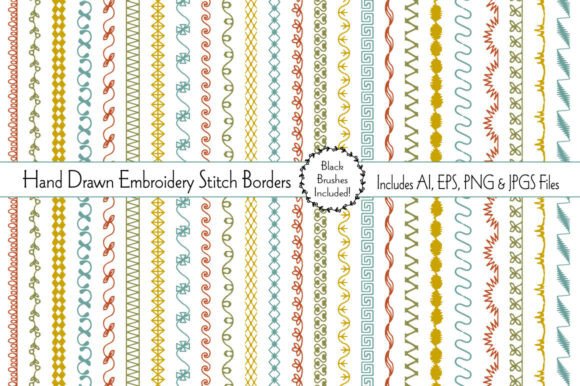
Hand Drawn Embroidery Stitch Borders offer a tactile, artisanal quality that brings warmth and personality to a wide range of creative and commercial projects. These 24 unique border patterns are inspired by traditional embroidery techniques, yet designed for modern digital use. Each border is hand-drawn with soft retro colors, making them ideal for seasonal projects, handmade cards, and custom branding elements. Whether you're a graphic designer, small business owner, or hobbyist crafter, these borders can serve as a flexible asset in both print and digital workflows.
Understanding the Components and File Types
The collection includes multiple file formats to support different use cases and software preferences. You receive two editable AI files and two editable EPS files, which are ideal for vector-based editing in Adobe Illustrator or similar programs. These formats allow for scaling without loss of quality, making them suitable for both small-scale print items like greeting cards and larger format applications like posters or packaging.
For users who need ready-to-use visuals without vector editing, 24 high-resolution JPG and PNG files are included, with PNGs featuring transparent backgrounds. This makes it easy to layer the borders over other design elements without unwanted background interference. The brushes included in black offer additional flexibility for customizing stroke weight, color, and length directly within your design software.
Integration into Creative and Commercial Workflows
These embroidery-style borders are not just decorative—they can play a functional role in organizing visual content, framing focal points, and reinforcing brand aesthetics. For example, a small business owner creating social media graphics can use these borders to highlight product features or separate sections of a digital flyer. Similarly, scrapbook enthusiasts can integrate them as decorative dividers or themed accents for baby showers, Easter celebrations, or vintage-inspired layouts.
In print-on-demand workflows, Hand Drawn Embroidery Stitch Borders can be applied to custom stickers, washi tape designs, or fabric prints. Because the patterns are scalable and editable, they can be adapted to fit various product formats without requiring additional illustration work. This saves time and maintains consistency across product lines.
Practical Use Cases Across Industries
- Graphic Design: Enhance branding materials with a handmade touch that differentiates your visuals from standard digital designs.
- Marketing: Create themed promotional assets for seasonal campaigns, especially around holidays like Easter or baby-related events.
- Education: Teachers and curriculum designers can use the borders to frame learning materials or highlight key information in worksheets and presentations.
- Entrepreneurship: Small business owners can apply these borders to packaging, thank-you cards, or limited edition product labels to add a personalized feel.
- DIY Craft: Hobbyists can incorporate the designs into handmade cards, scrapbooks, or home décor projects using print-and-cut methods or digital cutting machines.
How to Use Hand Drawn Embroidery Stitch Borders in Your Workflow
Depending on your project type and tools, there are several ways to incorporate these borders effectively. Here are some practical implementation strategies:
- Start with a template: If you're creating cards or logos, begin with a layout template and insert the border as a framing element. This helps maintain visual balance and prevents overcrowding.
- Customize brush settings: Open the included black brush file and adjust the stroke weight to match the scale of your project. This is especially useful when designing for different output sizes, from business cards to large-format posters.
- Recolor for brand alignment: Since the AI and EPS files are editable, you can change the color palette to match your brand or event theme. This ensures the borders remain versatile across different contexts.
- Layer with textures: Combine the borders with paper textures or digital fabric overlays to enhance the handmade aesthetic and add depth to your designs.
- Batch process for efficiency: When designing multiple items (e.g., a set of greeting cards), apply the borders in a consistent way across all files to maintain uniformity and reduce repetitive adjustments.
Compatibility and Technical Considerations
Before integrating these borders into your workflow, consider the software and output formats you're using. AI and EPS files are best for vector-based editing and print production, while PNG and JPG files are more suitable for web use, social media, or platforms that don't support vector files. Always test the borders in a sample layout before final production to ensure alignment, resolution, and color accuracy.
For digital crafters using tools like Cricut Design Space or Silhouette Studio, the PNG files with transparent backgrounds can be imported directly and used for cut lines or design overlays. If you're using the brush files, make sure your software supports custom brush imports and that you're working at an appropriate document resolution (300dpi for print, 72dpi for web).
Long-Term Value and Reusability
One of the strongest advantages of Hand Drawn Embroidery Stitch Borders is their adaptability across projects and seasons. Because the retro color palette is soft and versatile, these borders can be repurposed for multiple occasions without looking outdated. Store them in a dedicated folder within your design asset library for easy access. Consider creating a style guide or swatch sheet that shows how each border looks in different applications—this helps maintain consistency in branding or product design workflows.
As part of a larger asset management strategy, these borders can be grouped with other seasonal or thematic design kits, allowing for faster project setup and execution. When planning annual design calendars, you can schedule the use of these borders around key events like Easter, baby showers, or spring-themed promotions, ensuring you get the most out of your investment.
Quality Control and Consistency
To ensure the borders maintain a professional look across all uses, follow these best practices:
- Always scale from the original vector files when possible to avoid pixelation.
- Double-check alignment and spacing when placing borders around text or images.
- Use consistent stroke widths and colors across a single project to maintain visual harmony.
- When using multiple borders in the same design, choose ones with similar thickness and style to avoid visual clutter.
Final Thoughts on Implementation and Workflow Integration
Hand Drawn Embroidery Stitch Borders are more than just a design embellishment—they are a practical tool that bridges traditional aesthetics with modern digital workflows. By understanding how to integrate them effectively into your creative or business process, you can streamline design tasks, maintain visual consistency, and deliver more engaging content. Whether used for print, digital, or hybrid projects, these borders offer lasting value when incorporated thoughtfully and with intention.