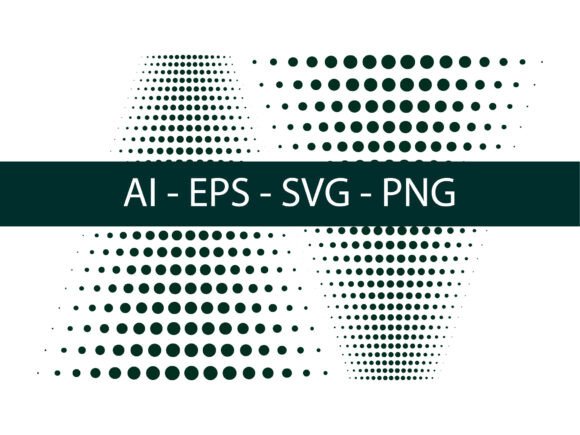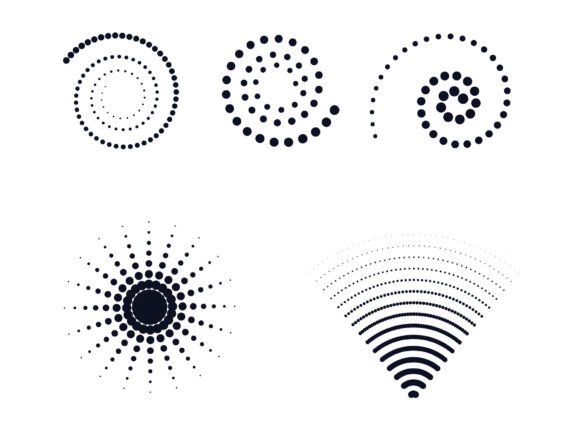
Halftone Dot Vector 01: Creative Power for Designers and Print Professionals
Halftone Dot Vector 01 is more than just a design element—it's a versatile tool for anyone working with Adobe Illustrator who wants to add depth, texture, and visual interest to their projects. Whether you're a graphic designer, marketer, or small business owner preparing print materials, understanding how to use halftone effects can significantly enhance your creative output. This resource gives you the flexibility to work across formats—AI, EPS, SVG, and PNG—making it easy to integrate into your existing workflow.
Why Halftone Dots Still Matter in Modern Design
In print and digital design, halftone dots simulate continuous tones using patterns of varying dot sizes and spacing. This technique, rooted in traditional printing, remains relevant today for its ability to create subtle gradients and textures without relying on complex color blending. Halftone Dot Vector 01 provides a ready-made solution for achieving this classic effect in Illustrator, saving time and reducing guesswork.
Designers can apply halftone effects in multiple ways, such as using the Effects > Pixelate > Color Halftone function, adjusting dot size and angle for custom results. However, Halftone Dot Vector 01 offers a more refined and scalable alternative, especially when working with vector-based illustrations that need to maintain clarity at any size.
How to Use Halftone Effects in Adobe Illustrator
Adobe Illustrator gives users several methods to create halftone effects. Here are three practical approaches that integrate well with Halftone Dot Vector 01:
- Effects > Pixelate > Color Halftone: A quick way to apply halftone textures to raster images. Adjusting the Max Radius and Angle values lets you control dot density and direction.
- Pattern Swatches: Create or import halftone patterns and apply them as fills. This method works well with vector shapes and allows for seamless tiling without quality loss.
- Scatter Brushes: For more organic halftone effects, use scatter brushes to distribute dots across paths. This mimics hand-drawn textures and adds a tactile feel to digital illustrations.
Halftone Dot Vector 01 enhances these techniques by providing pre-designed vector patterns that are easy to customize. Instead of building halftone effects from scratch, you can drop in a ready-made swatch and adjust it to fit your design needs.
Real-World Applications for Halftone Designs
Halftone effects are more than aesthetic—they serve functional roles in design. Here are a few practical use cases where Halftone Dot Vector 01 can make a difference:
- Print Design: Brochures, posters, and business cards gain visual texture without overwhelming the eye. The halftone pattern can subtly separate sections or highlight key elements.
- Brand Identity: Logos and brand assets can incorporate halftone textures to add depth and a retro-modern aesthetic, helping your brand stand out in a crowded market.
- Editorial Layouts: Magazines and newsletters benefit from halftone overlays that enhance photos or background elements without compromising readability.
- Web Graphics: Even in digital design, halftone textures add dimension to icons, buttons, and infographics—especially when used sparingly.
These applications show how Halftone Dot Vector 01 supports both aesthetic and communicative goals. Whether you're designing for print or screen, the ability to add controlled texture helps elevate your visuals without complicating the message.
Who Benefits Most from Halftone Vector Resources?
Creatives across disciplines can find value in Halftone Dot Vector 01. Freelancers and agencies often need to deliver polished, unique visuals quickly—this resource offers a head start. Small business owners creating marketing materials in-house can use halftone effects to achieve a more professional look without advanced design skills.
Educators and bloggers may also benefit by using halftone textures to illustrate tutorials or infographics. Even hobbyists experimenting with Illustrator can explore new visual styles without a steep learning curve. The key is that Halftone Dot Vector 01 serves as a flexible tool rather than a one-size-fits-all solution.
Time-Saving and Creative Flexibility
One of the biggest advantages of Halftone Dot Vector 01 is efficiency. Instead of spending time creating halftone patterns manually or adjusting pixel-based effects, you can apply a pre-designed vector swatch and modify it instantly. This not only saves time but also ensures consistency across your designs.
Additionally, because the resource includes AI, EPS, SVG, and PNG formats, you’re not limited to Illustrator. You can import halftone graphics into other design software or export them for web and print use without quality loss. This flexibility makes Halftone Dot Vector 01 a valuable asset for multi-platform projects.
Considerations and Limitations
While Halftone Dot Vector 01 offers many benefits, it’s important to use it thoughtfully. Overuse of halftone effects can clutter a design or distract from the main message. It works best when applied sparingly—such as in background elements, overlays, or accents.
Also, depending on the print method or screen resolution, halftone dots may appear differently than expected. Always test your designs in the intended output format to ensure clarity and visual impact. When working with clients or print vendors, communicate the use of halftone effects early to avoid unexpected results.
Final Thoughts: Enhance Your Design Workflow with Halftone Dot Vector 01
Halftone Dot Vector 01 is a practical resource for designers looking to add depth, texture, and professional polish to their work. Whether you're creating print materials, digital graphics, or branding elements, this tool gives you the flexibility to experiment with halftone effects without the hassle of building them from scratch.
By combining Halftone Dot Vector 01 with Illustrator’s native tools—like pattern swatches, brushes, and color halftone effects—you can unlock new creative possibilities. The result is more engaging, visually layered designs that communicate your message effectively and stand out from the crowd.