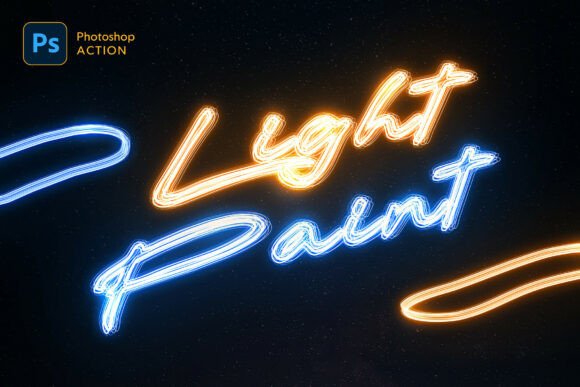
Light Painting Photoshop Action: Streamlining Creative Effects for Modern Design
Designers today are under constant pressure to produce visually compelling content quickly and efficiently. In this context, tools like the Light Painting Photoshop Action have emerged as valuable assets, enabling creators to apply complex glowing effects with minimal effort. Whether you're working on a poster, album cover, or digital illustration, this Photoshop action simplifies the process of adding dynamic, neon-lit visuals that resonate with modern audiences.
At its core, the Light Painting Photoshop Action is a pre-recorded set of instructions that automates the creation of glowing strokes. It supports text, shapes, and custom paths, offering five distinct light styles and five vibrant color choices. This flexibility allows designers to tailor the effect to different projects without requiring deep technical knowledge of Photoshop layering or brush techniques.
Meeting the Demand for Speed and Quality
The design industry has shifted dramatically in recent years. Clients and audiences expect high-quality visuals at an accelerated pace. Manual creation of light effects—once a hallmark of advanced Photoshop skill—has become impractical for many workflows. The Light Painting Photoshop Action addresses this shift by providing a non-destructive, repeatable solution that maintains creative control while saving time.
Consider a freelance designer tasked with creating multiple social media graphics for a nightlife event. Without an automated tool, applying glowing neon text or path outlines would require multiple steps and careful layer management. With this Photoshop action, the same results can be achieved in seconds, allowing the designer to focus on layout, composition, and client feedback rather than technical execution.
From Studio Effects to Digital Neon
Historically, light painting was a photographic technique involving long exposure and handheld light sources. As digital design evolved, artists began replicating these effects in software like Photoshop. Early digital attempts required meticulous brushwork and layer blending, limiting accessibility to experienced users. Today, the Light Painting Photoshop Action bridges the gap between artistic intent and technical execution, making it possible for creators at all skill levels to produce professional results.
This evolution mirrors broader trends in creative software—tools are becoming more intuitive, more modular, and more accessible. Designers no longer need to memorize complex layer structures or spend hours fine-tuning glow settings. Instead, they can apply a pre-configured effect and adjust it to suit their needs, preserving the creative essence while streamlining the process.
Practical Applications Across Industries
From marketing materials to personal art projects, the Light Painting Photoshop Action offers versatile applications. Here are a few real-world scenarios where it can make a meaningful difference:
- Event posters – Nightlife venues, music festivals, and themed parties often rely on glowing text and neon aesthetics to capture attention.
- Album covers – Musicians and graphic designers can create striking visuals that align with genres like synthwave, electronic, or alternative rock.
- UI/UX elements – Web and app designers can use the glowing effects to highlight interactive components or create futuristic interface themes.
- Personal branding – Entrepreneurs and influencers may incorporate neon-style lettering into logos or promotional assets to stand out on digital platforms.
Each of these use cases benefits from the action’s non-destructive nature. Designers can revisit and reapply the effect as needed, making it easy to adapt visuals for different formats or audience preferences.
Supporting Multilingual and Global Workflows
One standout feature of the Light Painting Photoshop Action is its multilingual compatibility. Designers working in different language versions of Photoshop can use the tool without encountering interface or functionality issues. This capability is especially valuable in global creative teams, where consistency across software environments is essential for collaboration.
Additionally, the package includes a PSD template for beginners, an ANT action file, an ABR brush set, and a detailed PDF help guide. These resources lower the learning curve and ensure that users can start applying the effect immediately, regardless of their Photoshop proficiency.
Optimizing Efficiency Without Sacrificing Flexibility
While automation tools can sometimes feel restrictive, the Light Painting Photoshop Action is designed to be flexible. Because it’s non-destructive, users can modify the base layer—such as changing the text or adjusting the path—without needing to reapply the effect from scratch. This adaptability supports iterative design, where small adjustments can significantly impact the final outcome.
For example, a designer working on a poster might initially apply a blue glow to a headline. Later, after reviewing with a client, they may want to switch to purple. With this action, that change can be made quickly by adjusting the color selection rather than rebuilding the effect entirely.
Choosing the Right Tools for Modern Creativity
In a world where design expectations continue to rise, tools like the Light Painting Photoshop Action help professionals stay competitive. By reducing repetitive tasks and offering polished results in seconds, it allows creators to focus on storytelling, composition, and client engagement rather than technical execution.
As design software continues to evolve, we’re likely to see more tools that blend automation with creative control. The Light Painting Photoshop Action exemplifies this trend—offering a streamlined way to achieve complex visual effects while remaining customizable for professional use. Whether you're a seasoned designer or a hobbyist looking to enhance your visuals, this action is a practical addition to your creative toolkit.